Install Motion Path — it’s free → See the product page
The short answer: Lottie is a JSON file describing vector shapes and the keyframes that move them. It is what iOS, Android, React Native and web teams use to ship an animation rather than describe one. Figma Motion cannot produce it — Figma’s native Copy as gives you CSS, React and JSON, but not Lottie. Motion Path adds it, under … → Copy as code → Lottie.
This is the orientation page. If you are not yet sure whether Lottie is what you need, read this one; if you already know and want the clicks, go to Figma Motion export to Lottie.
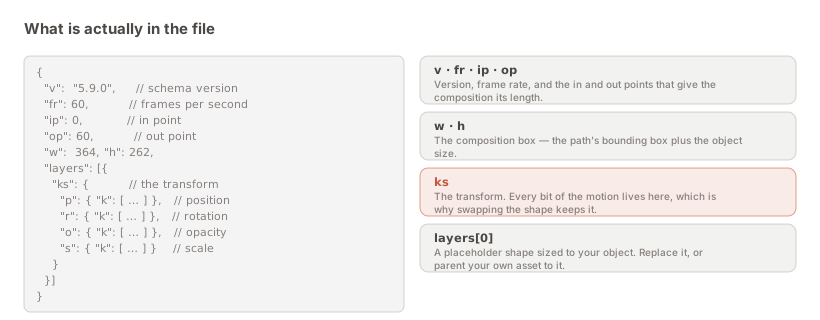
It is a text file. That is the first surprising thing about it, and most of what follows comes from it.
Where an MP4 is a sequence of encoded pictures, a Lottie is a set of instructions: here is a shape, here is where it is at frame 0, here is where it is at frame 60, and here is how it gets between them. A player reads the instructions and draws the result at runtime.
The format came out of Airbnb, which built players for iOS, Android and the web so that one animation file could run everywhere rather than being rebuilt three times. Those players — lottie-ios, lottie-android, lottie-web, and lottie-react-native alongside them — are why the format won: the file is genuinely portable, not portable in principle.
Three properties, and each one is something a video cannot do.
It is vector, so it has no resolution. The same file is crisp on a small phone and a 5K display. No 2× and 3× variants, no re-export when a new device size appears.
It is small. Repetitive numeric text compresses extremely well, and a Lottie is usually lighter than the MP4 of the same animation — frequently much lighter, and for a mobile app that ships the file in its bundle, that is a real number someone is tracking.
It is drivable. This is the one that changes what motion can be. A player can pause a Lottie at 40% while a form validates, run it in reverse when an action is undone, speed it up on a fast connection, or play only a frame range. An animation that responds to application state is interface; an animation that plays start to finish regardless is decoration. Lottie is what lets the first kind exist.
Figma’s Motion panel is a real animation tool, and its handoff story is better than people give it credit for. Select an animated layer, open Copy as, and you can take CSS, React or JSON. Dev Mode inspects the keyframes properly.
What it does not have is a Lottie export. So the moment your motion is going into an app rather than onto a web page, Figma’s native handoff stops short of the format your engineers actually consume — and the fallback is a screen recording plus a written spec, which is where motion designs go to be renegotiated.
There is a second gap worth knowing about, in the authoring rather than the export. Open Figma’s Motion → Animations panel and you will see Position, Scale, Rotation, Size, Opacity… and then Path, greyed out and unavailable. Animating a layer along a curve is not something native Motion can do yet.
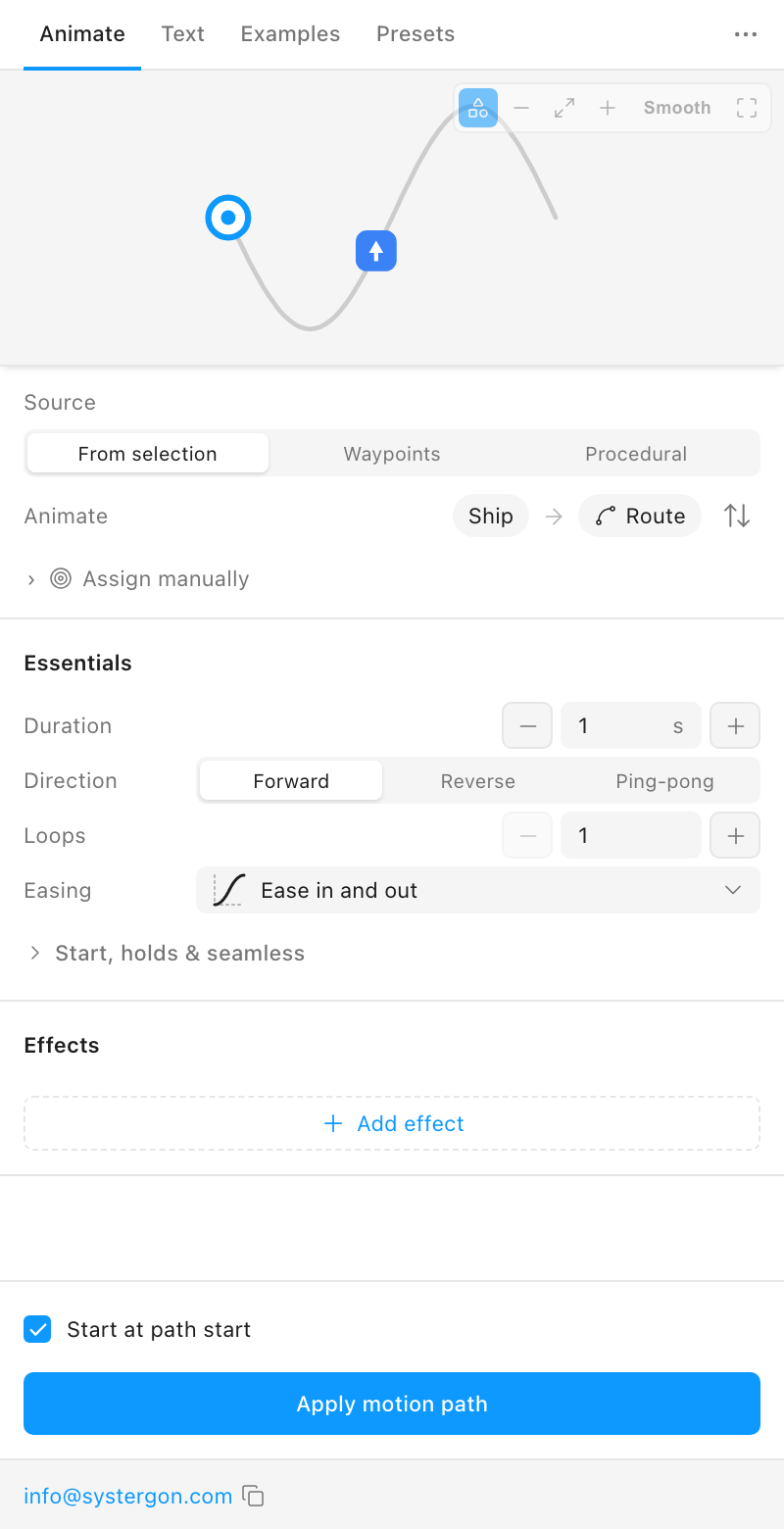
Motion Path fills both gaps, and it fills the first one because of how it fills the second.
The plugin does not run its own animation engine. It samples your path and writes native Figma Motion keyframe tracks onto the layer — position, rotation, scale, opacity, path trim.
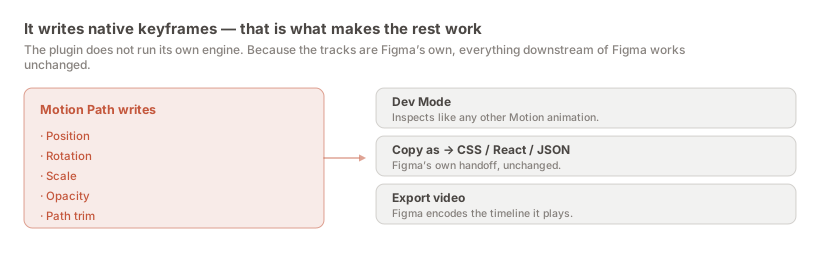
Three consequences follow, and they are the reason this matters rather than being an implementation detail:
Everything Figma offers keeps working. Dev Mode inspects the animation. Copy as emits CSS, React and JSON from it. Figma’s own video encoder can record it. None of that would be true of a plugin that ran its own runtime.
Your file does not depend on the plugin. Uninstall it and the animation is still there, still native, still exportable. The plugin is a way of authoring the tracks, not a thing your design sits inside.
And there is nothing to migrate if Figma ships path animation itself. The data is already Figma’s.
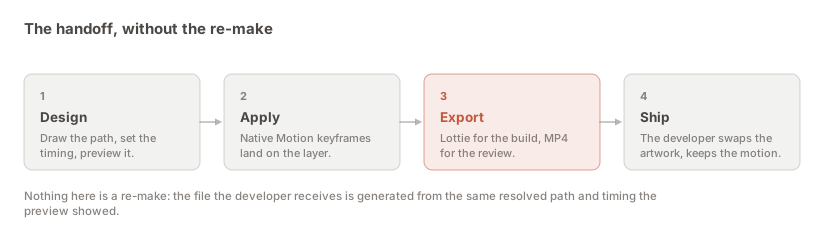
Three clicks once the motion is applied.
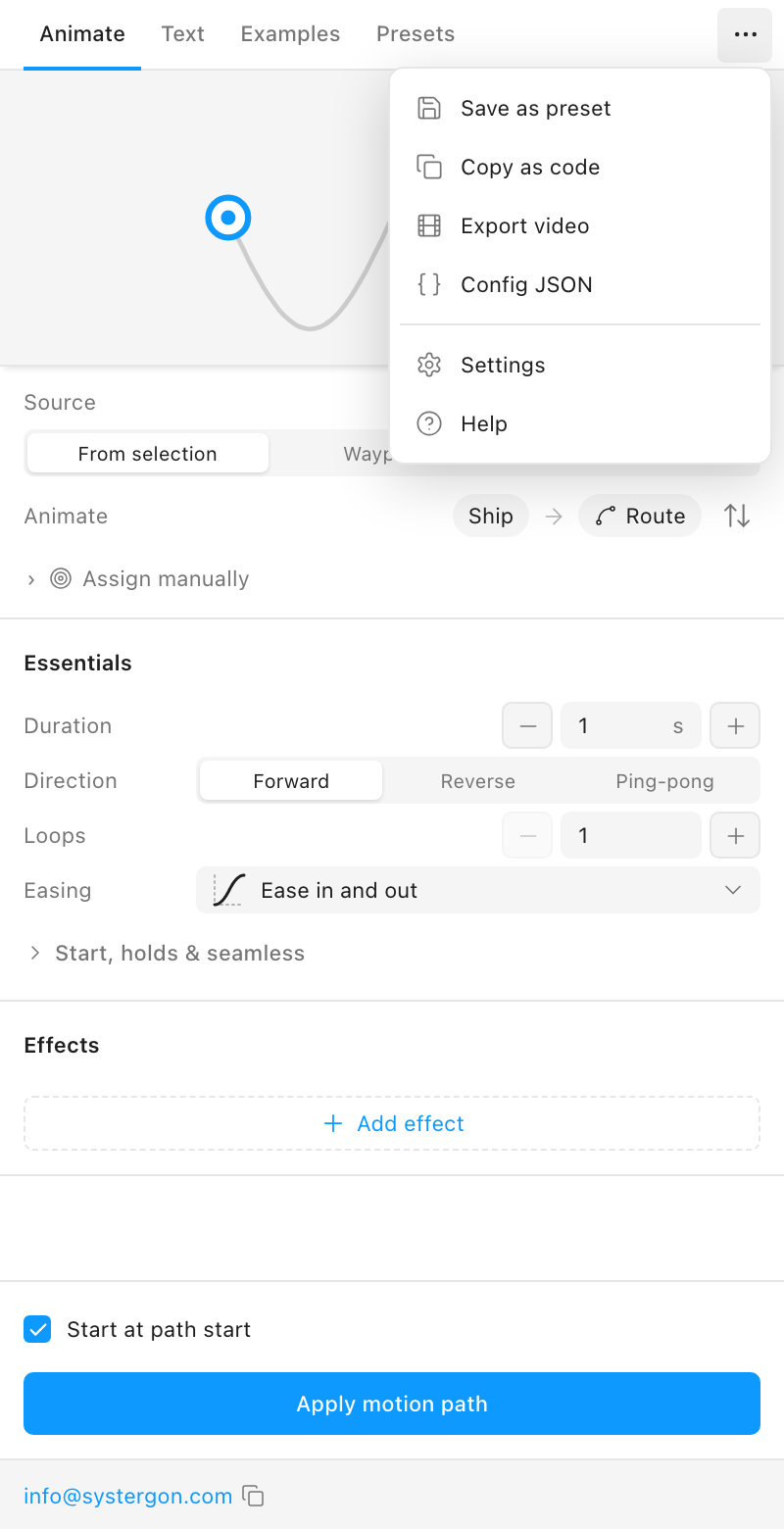
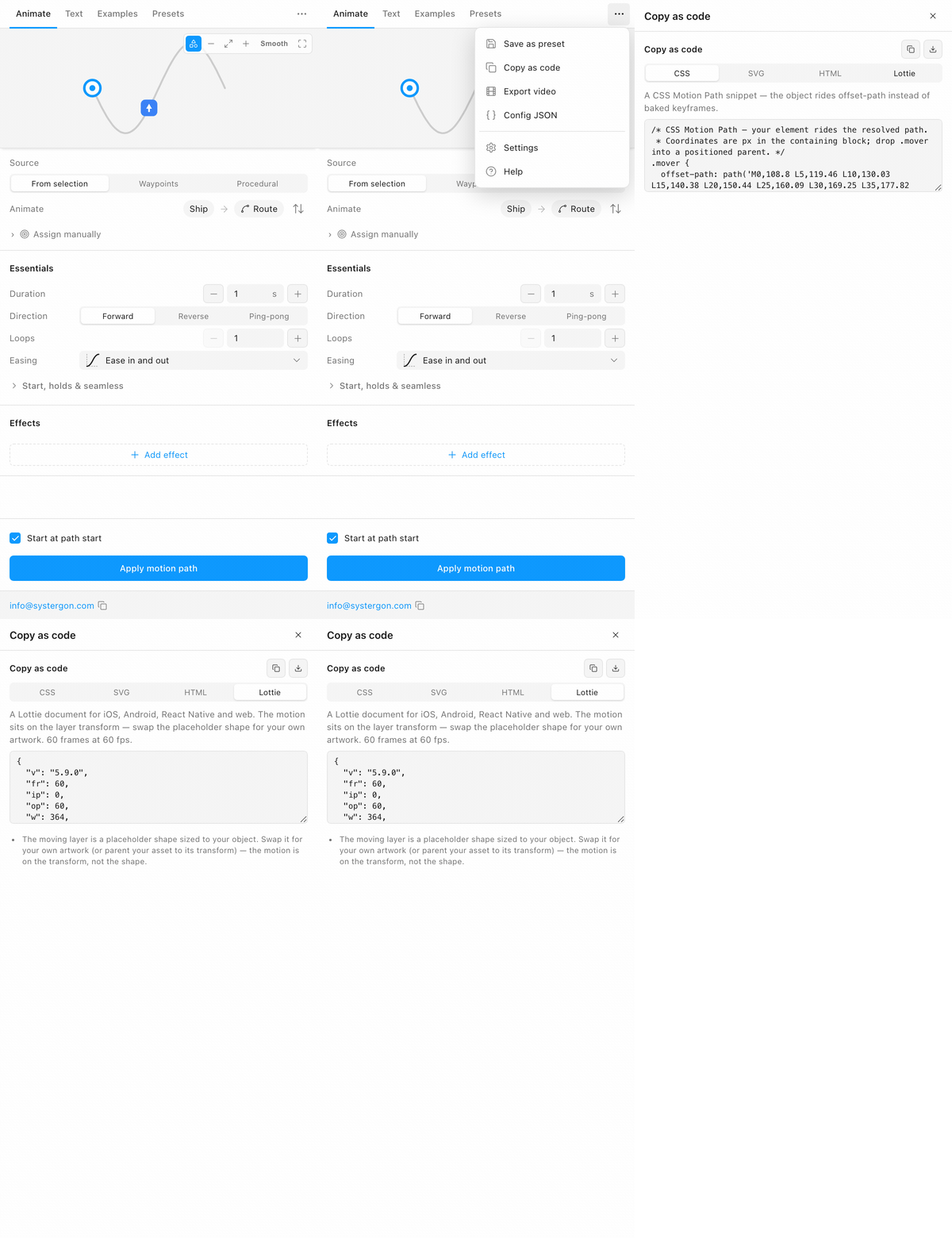
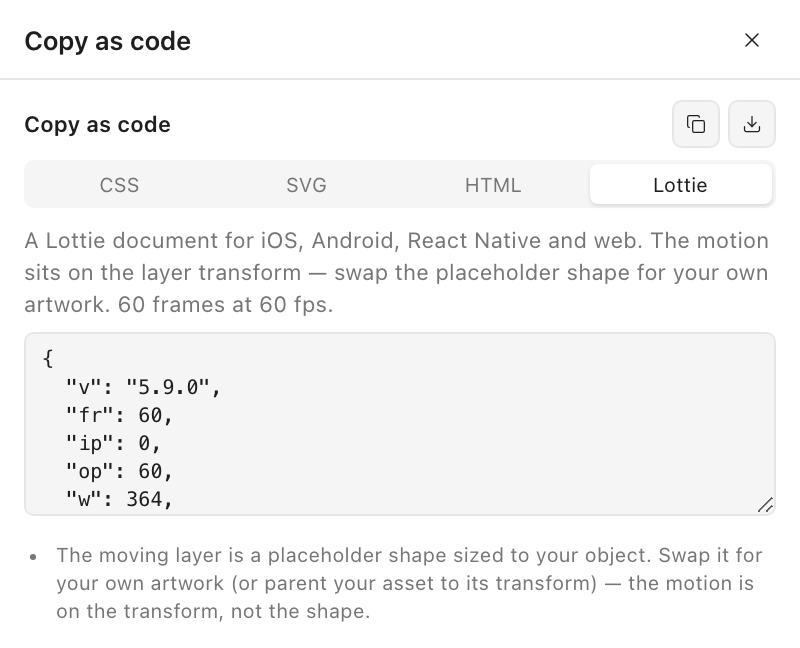
Copy it, or download it as motion-path.json. The step-by-step guide covers each step properly.
Lottie is not always right, and the cases where it is wrong are worth knowing before you standardise on it.
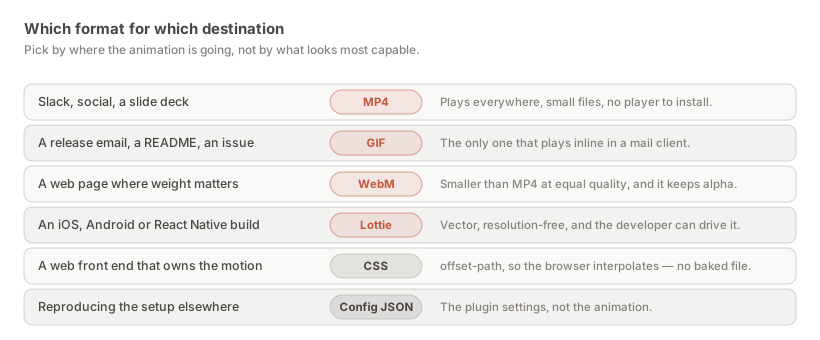
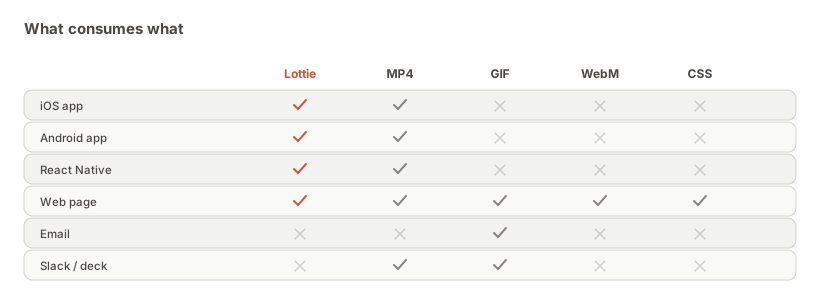
Against GIF. No contest on quality — GIF is 256 colours and much heavier — but GIF plays inline in email, READMEs and issue trackers, and Lottie does not. That single property keeps GIF alive.
Against MP4. MP4 asks nothing of anyone: it plays in Slack, on a phone, in a deck, with no player and no integration work. If the recipient is going to watch the animation rather than build with it, MP4 is the right answer and a Lottie is an obstacle. See the MP4 guide.
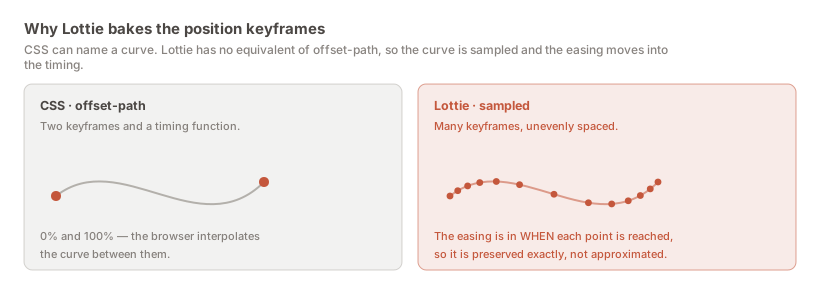
Against CSS. On the web specifically, CSS is often the better artefact. The same panel emits an offset-path snippet: two keyframes and a timing function, readable, and editable by a front-end developer who wants to adjust the curve. A Lottie’s few hundred baked keyframes are not something anyone edits by hand. Choose Lottie on the web when the animation is complex or shared with a mobile app; choose CSS when it is a simple interaction the browser should own.
The general rule: a rendering for people, a description for builds. The export hub lays out all the routes.
Two things surprise people the first time, and both are deliberate.
The shape is a placeholder. The moving layer is a rectangle sized to your object rather than your artwork. The motion lives on the layer transform, not in the shape, so a developer swaps in the production asset — or parents it to the transform — and keeps the animation exactly. One motion file can drive different artwork, which is a feature the first time an icon gets redrawn after sign-off.
There are far more keyframes than you drew. Lottie has no equivalent of CSS’s offset-path, so a curve cannot be two keyframes and a timing function — it has to be sampled. The easing then lives in the spacing of those samples, which means it is preserved exactly rather than approximated.
And one thing to be aware of before you promise anything: effects that live in the artwork rather than on the transform — colour shift, motion blur, motion trail, squash & stretch, anticipation — cannot cross over. The plugin names whichever applied to your animation in the notes rather than dropping them silently. The fidelity guide works through each.
It helps to have concrete cases in mind, because “we should use Lottie” in the abstract rarely survives a planning conversation.
The most common is feedback on a completed action — a success tick, a saved state, a sent confirmation. These are short, they are everywhere in a product, and they benefit from being drivable: the animation plays when the request succeeds, not on a timer.
Second is loading and progress, where the drivability matters even more. A Lottie can be held at a frame while work is in flight and released when it completes, which is something no rendered clip can do — and it is the difference between an animation that reflects what the system is doing and one that merely occupies the user.
Third is onboarding and empty states, where the argument is mostly about weight and crispness. These animations tend to be large on screen, which is exactly where a video’s resolution shows and a vector’s does not.
Where it is used least is anything long, photographic, or full-bleed. Lottie is a vector format; it has no advantage over video for a filmed clip or a complex illustration with hundreds of shapes, and at some point the file stops being small.
A fair question, because a format is a commitment and the cost is not zero — someone has to add a player dependency, and there is a first-time conversation about who owns the files.
It is worth it when motion is part of your product rather than part of your presentations: when animations appear in the interface, respond to state, and get iterated. In that world Lottie removes an entire class of work — the rebuilding, the spec-writing, the arguing about whether the implementation matches the design — because the file is the design.
It is not worth it when animation is something you show in reviews and ship rarely. There, the overhead of a player and a handoff convention buys you nothing that a good MP4 does not, and you should send the MP4.
The middle case — a few key animations, shipped, iterated occasionally — is where most teams actually live, and it is worth it there too, mostly because one file covers every platform. A change to the motion becomes one re-export rather than four implementation tickets.
A JSON file format for vector animation: shapes plus the keyframes that move them, drawn at runtime by a player. It originated at Airbnb and has official players for iOS, Android, the web and React Native, which is why one file can run on every platform.
Not natively. Figma’s Copy as produces CSS, React and JSON from a Motion animation, and Dev Mode inspects the keyframes, but there is no Lottie output in Figma itself. A plugin has to generate it.
Install Motion Path, animate your layer, press Apply motion path, then open the … menu and choose Copy as code → Lottie. Copy the JSON or download it as motion-path.json.
Lottie for anything going into a product — it is smaller, resolution-free, and can be driven by application state. GIF only where a video element will not run, which in practice means email, READMEs and issue trackers.
MP4 if the recipient will watch the animation; Lottie if they will build with it. Sending both is often the right answer: the MP4 so a ticket is understandable at a glance, the Lottie so it is buildable.
Not automatically. For a simple interaction the browser should own, CSS offset-path is more readable and a developer can adjust the curve by hand. Lottie wins when the animation is complex, or when the same motion also has to run in a mobile app.
No. The export is three clicks and produces a file you hand over. Everything about players and integration is your developer’s side of the line.
Everything on the layer transform — position, rotation, scale, opacity, easing — carries over exactly. Effects that live in the artwork or on the canvas cannot, and the plugin names them at export time rather than dropping them quietly.
Yes, on the Figma Community, with the Lottie and video exports included. Install it here.
Install Motion Path — it’s free → Browse 300+ animation examples