Install Motion Path — it’s free → See the product page
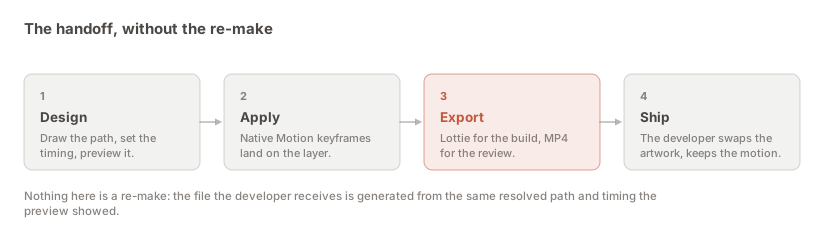
The short answer: in Motion Path, apply your motion, then … → Copy as code → Lottie and download motion-path.json. Send that file to your engineers along with an MP4 of the same animation and the three sentences in the section below. That combination — the runnable file, the visual reference, and the caveats stated up front — is what turns a motion design into shipped motion instead of a re-make.
This page is about the handoff rather than the button. The clicks take fifteen seconds; the difference between a handoff that lands and one that generates four rounds of Slack is almost entirely in what you say alongside the file.
A motion design that only exists inside a Figma file is a design that somebody else has to re-make. That is the whole problem, and it is worth naming precisely because the usual fixes do not address it.
Sending a screen recording does not help: an engineer cannot ship pixels, so they rebuild the motion by eye, and every judgement you made about easing and timing gets renegotiated by someone watching a compressed video frame by frame. Sending a written spec does not help either — “ease out over 400ms” is a description of a curve, not the curve, and two people implementing that sentence will produce two different animations.
Lottie fixes it by being the actual thing rather than a description of it. The file is the animation: the same document runs on iOS, Android, React Native and the web, and the timing in it is the timing you approved.
A single JSON file, typically a few hundred kilobytes, that any of the four official Lottie players reads without configuration.
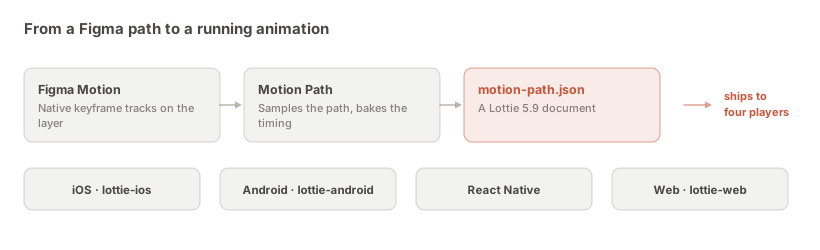
Inside, the structure is deliberately plain: a composition with a frame rate and a length, and one layer whose transform carries the motion.
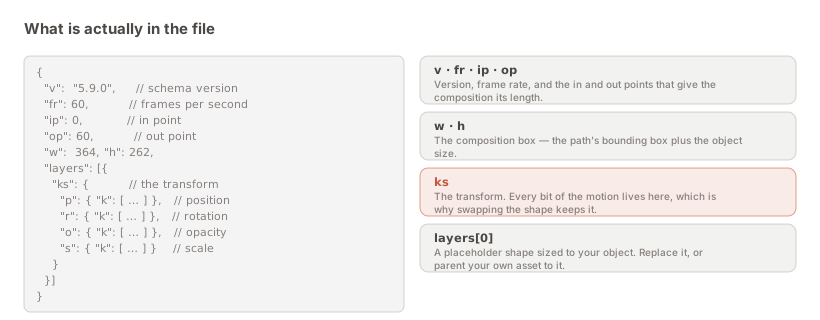
The plainness is the feature. There is nothing exotic in the file, which is why it renders identically across players rather than beautifully in one and subtly wrongly in another.
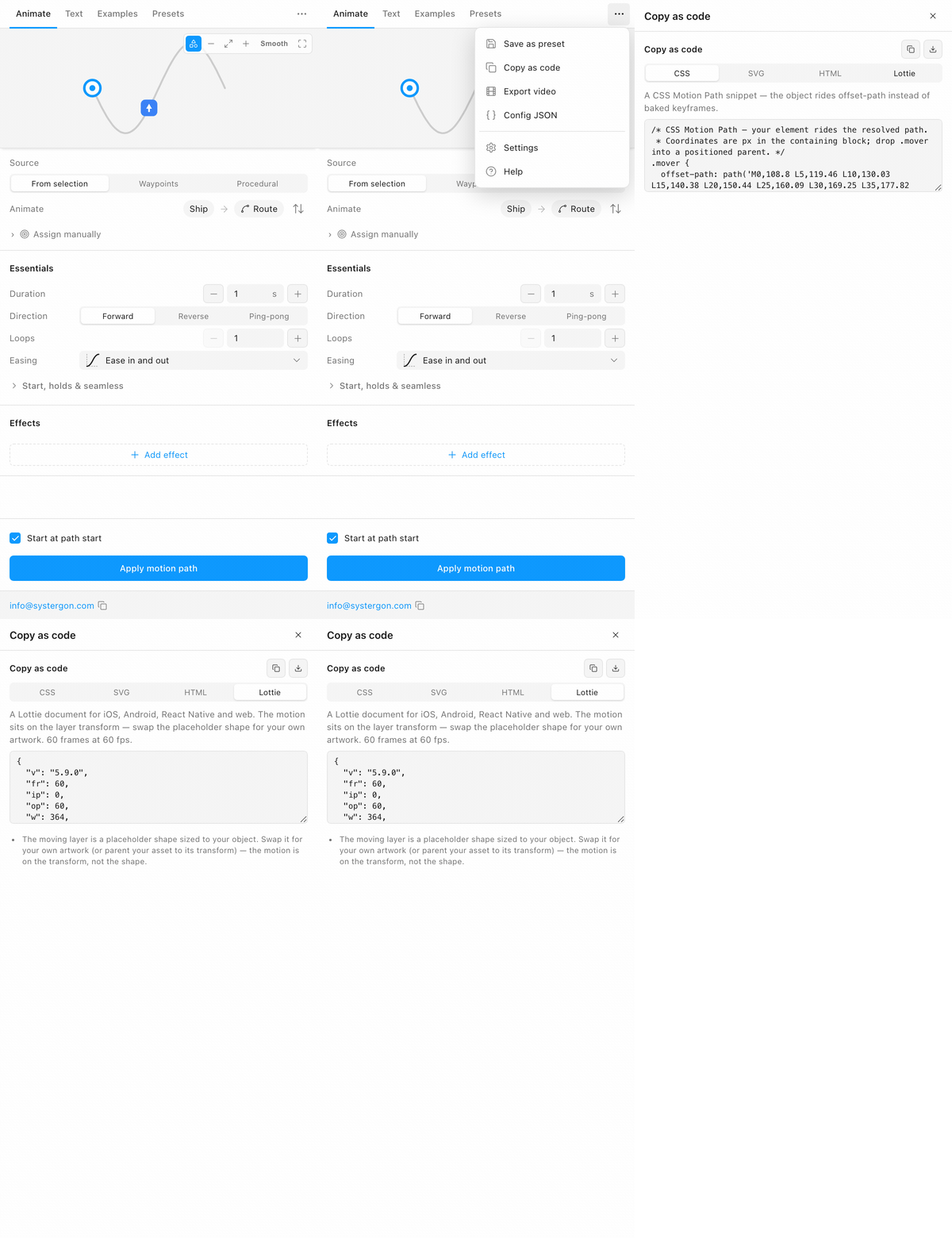
For completeness, since the rest of this page assumes you have one. Apply the motion first: the plugin’s live preview writes nothing to the canvas, and the export reads the canvas.
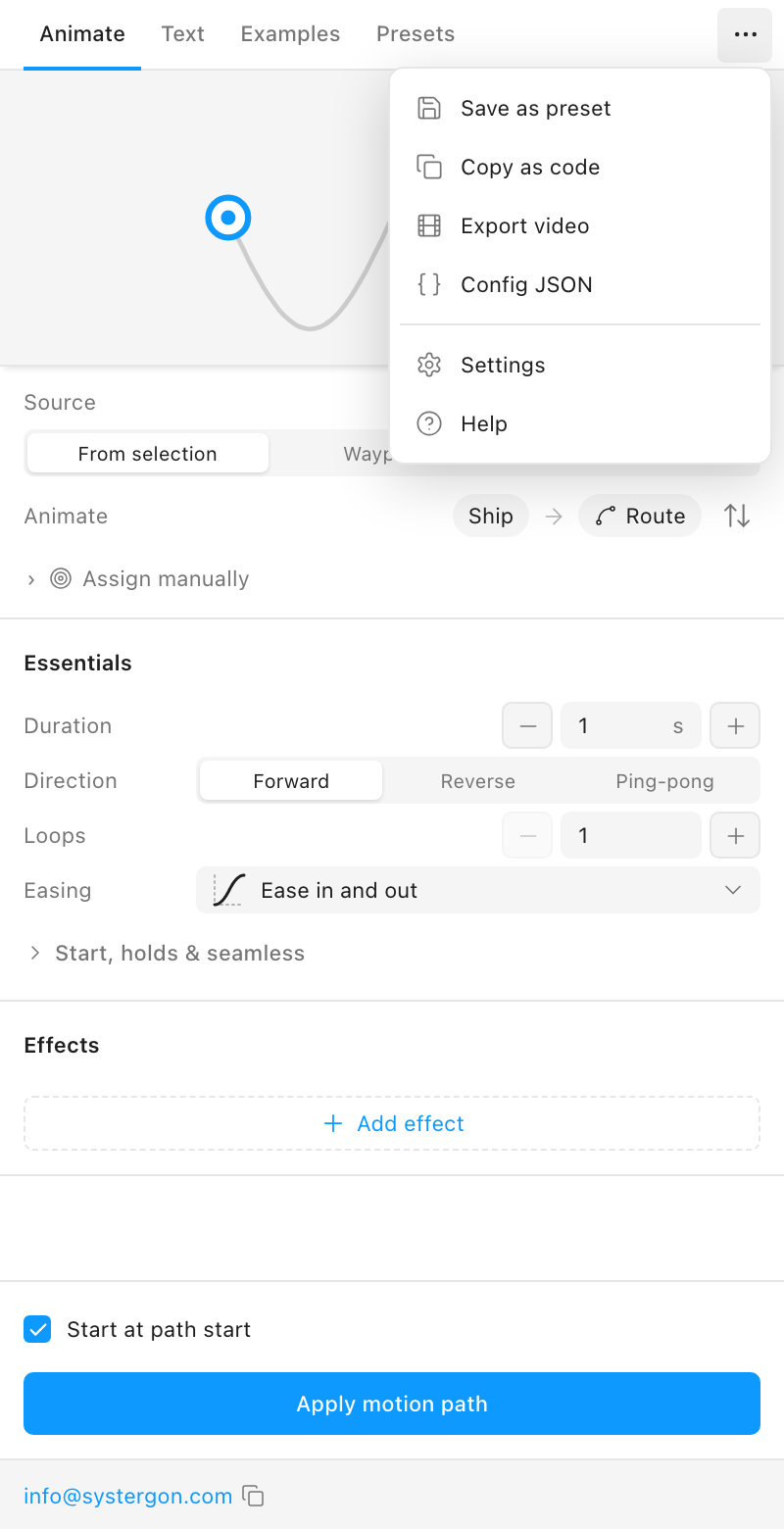
Then Copy as code, the Lottie tab, and the download icon in the panel header:
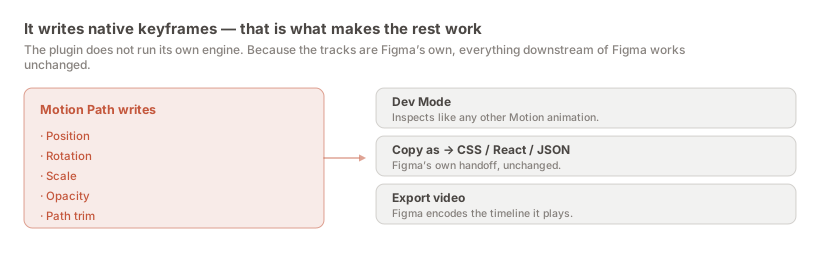
One structural point that matters to engineering more than it does to you: the plugin does not run its own animation engine. It writes native Figma Motion keyframes onto the layer, and generates the Lottie from those. So the file is regenerable, Dev Mode still inspects the animation, and nothing in the Figma file depends on the plugin staying installed.
Each of these prevents a specific round trip. They are worth pasting into the message rather than assuming.
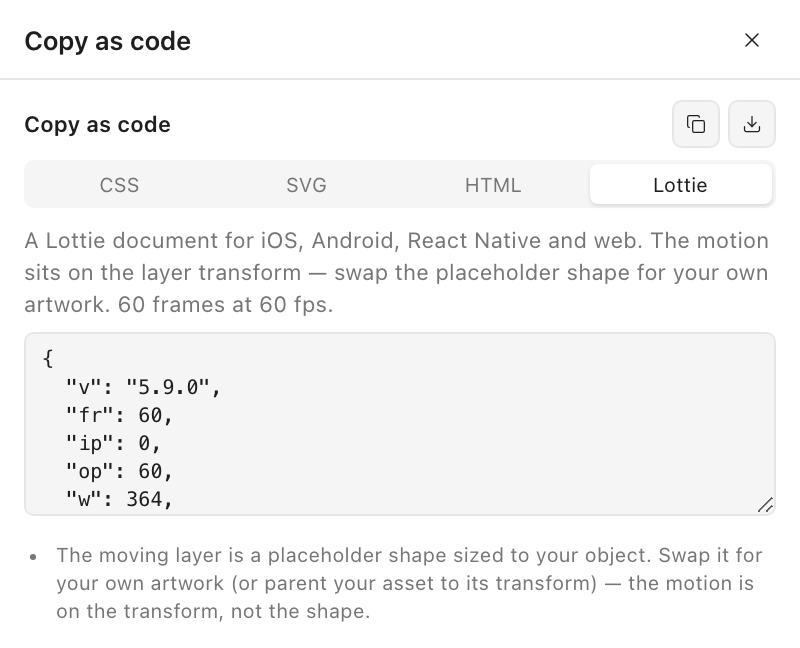
The layer in the file is a rectangle sized to your object, not your icon. That looks like a bug if nobody says otherwise, and it is the most common first message back.
It is deliberate, and the reason is structural: the motion lives on the transform, not in the shape. Because of that, a developer can replace the placeholder with the production asset — or parent their existing asset to that transform — and lose nothing. The same file can drive different artwork, which is exactly what you want when an icon gets redrawn but the motion is signed off.
Lottie treats looping as a player option rather than a property of the document: loop: true in lottie-web, the loop prop in React Native, loopMode on iOS, the equivalent on Android. So the JSON contains one clean traversal.
If your Figma animation repeated the traversal on its timeline, the plugin says so in the notes rather than baking the repeats into the file. That is the right default — a looped file that the player then loops again is a bug that only shows up as a slightly wrong rhythm, which is the worst kind to find.
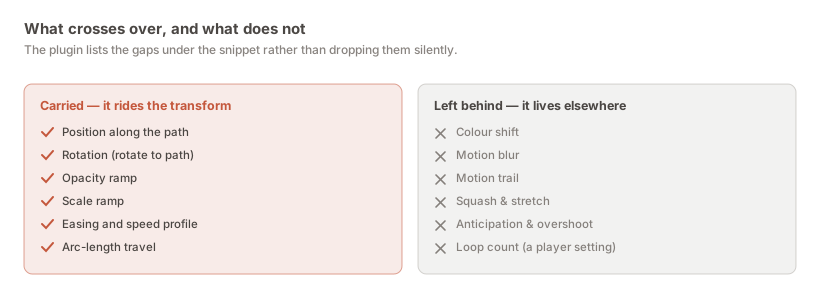
The plugin prints notes under the snippet naming anything in your animation that Lottie cannot carry. Forward them. An effect that quietly vanished is discovered on a device in QA and becomes an argument about whether the implementation is wrong; an effect named at export time is a decision the two of you make together, now, cheaply.
The pattern is consistent enough to explain in a sentence: anything riding the layer transform crosses over, anything living in the artwork or on the canvas does not. The fidelity guide works through each case.
This is the cheapest improvement available to most handoffs, and it costs one extra export.
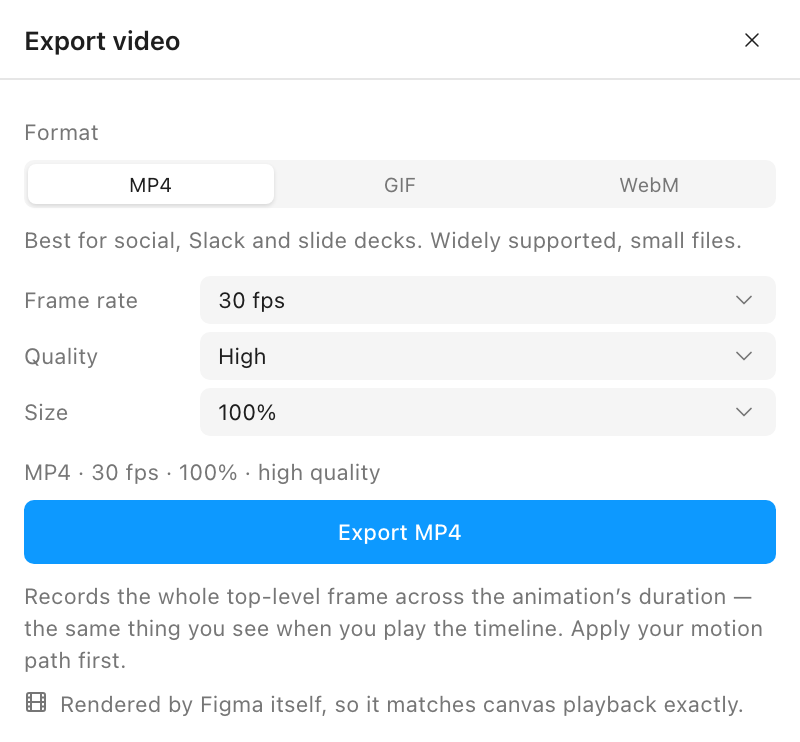
A Lottie is a runnable artefact, and running it requires opening something. An engineer triaging fifteen tickets will not do that to understand what a task is about — but they will watch a two-second clip that autoplays in the ticket. The MP4 answers “what am I building?” in one second; the JSON answers “how do I build it?” when they sit down to it.
The video export guide covers the settings; the defaults are right for this.
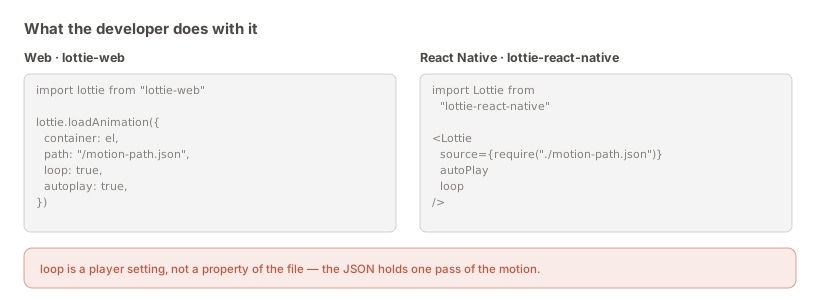
It is short everywhere, which is worth knowing when you are asking for the work to be prioritised — the integration is rarely the expensive part.
lottie-web, pointed at the JSON as a static asset.lottie-react-native, with the file bundled through require.lottie-ios, the JSON in the app bundle, played through a LottieAnimationView.lottie-android, the JSON in src/main/assets.The reason this matters to a designer is not the API. It is that all four consume the same file, so one export covers every platform — and a change to the motion is one re-export rather than four separate implementation tickets.
Worth having ready, because someone will ask why an MP4 is not enough.
A Lottie is vector, so it is resolution-free — the same file is crisp on a phone and on a 5K display, with no 2× and 3× variants to produce. It usually weighs less than the video of the same animation. And, most importantly, it is drivable: a player can pause it at 40% while a form validates, run it in reverse when an action is undone, speed it up on a fast connection, or play only a frame range. None of that is possible with pixels.
That last capability is the one that changes what motion can be in a product. An animation that responds to state is interface; an animation that plays start to finish regardless is decoration. Lottie is what lets the first kind exist.
The animation will be reviewed eventually, and it goes better if you decide in advance what you are reviewing against. Two failure modes account for most of the disagreements.
The first is context. An animation that reads beautifully alone on a canvas can be far too slow when it sits between a tap and a screen transition, because in the file it is the only thing happening and in the product it is holding the user up. This is not an implementation bug and asking an engineer to “make it match Figma” will not fix it — the honest response is to shorten it and re-export.
The second is the placeholder swap. Once real artwork replaces the placeholder shape, the motion is unchanged but the perception of it is not: a heavier or larger asset reads as slower at identical timing, and an asset with a different visual centre can look like it is drifting off the path when the transform is exactly right. Check the swapped version, not the exported file, before signing anything off.
Neither of these is a reason to distrust the export. They are reasons to review the animation where it will actually live — which is the same advice as for any other part of an interface, and just as easy to skip.
Three decisions save a lot of friction if made before the first file rather than after the third.
Who owns the file after handoff. Either the designer owns it and it is regenerated from Figma, or engineering owns it and Figma becomes a reference. Both are legitimate. What is not legitimate is nobody deciding, because then the file gets hand-edited once and the Figma file silently stops being the source of truth — and nobody finds out until the next export overwrites the edit.
Re-export rather than hand-edit. Following from that: if the motion needs to change, change it in Figma and export again. The export is cheap, and it is the whole reason the plugin writes native Figma keyframes rather than running its own engine — the file stays regenerable. Runtime differences like speed belong in the player, where they are meant to live.
Naming. Every export downloads as motion-path.json. Rename for the behaviour it represents — checkout-success.json — before it enters a repository, or you will have four identically named files and a bad afternoon.
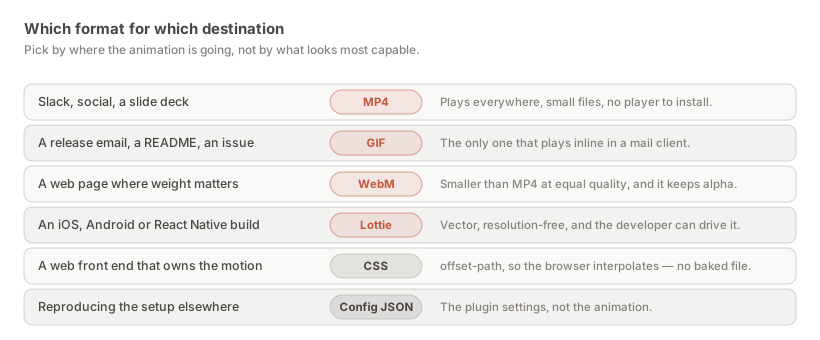
If the motion is a web interaction the browser should own, CSS is often the better artefact — the same panel emits an offset-path snippet that a front-end developer can read and edit, rather than a few hundred baked keyframes they cannot. If the animation depends on an effect Lottie cannot carry, a video is more honest than a Lottie that quietly differs. And if the recipient is approving rather than building, send the video alone; the JSON is noise to them.
Export Lottie from Motion Path (… → Copy as code → Lottie → download), and send that file with an MP4 of the same animation plus three notes: the shape is a placeholder, looping is a player setting, and here is what did not cross over.
lottie-web, lottie-ios, lottie-android and lottie-react-native. The export writes schema 5.9, which every maintained release of those reads, and it keeps to the transform tracks all four implement identically.
It is a placeholder by design. The motion lives on the layer transform rather than in the shape, so a developer swaps in the production asset — or parents it to that transform — and keeps the motion exactly. It also means one motion file can drive different artwork.
Not strictly, but it is the cheapest improvement available. A ticket with an autoplaying two-second clip gets understood during triage; a ticket with only a JSON attachment gets opened later, or not at all.
They can change playback speed, direction and which frame range plays — all player settings. Changing the easing or the path means changing the design, which should come back to Figma and be re-exported.
It should. The export deliberately sticks to transform tracks that every player implements the same way, rather than reaching for newer Lottie features with uneven support. That is the reason the file is as plain as it is.
Typically a few hundred kilobytes of repetitive numeric text, which compresses very well over the wire — usually smaller than the MP4 of the same animation, and unlike the MP4 it is resolution-independent.
Those cannot cross over — they live in the artwork or on the canvas rather than on the transform. The export notes will name them. Either accept the difference, rebuild that part in the player, or hand over a video instead if the effect is essential.
Yes, on the Figma Community, exports included. Install it here.
Install Motion Path — it’s free → Browse 300+ animation examples