Install Motion Path — it’s free → See the product page
A Community reviewer left a note that was equal parts kind and sharp: “Very good plugin — but why can’t I select the start point when the path is an ellipse?” They were right. This small update fixes exactly that, and ships a preview upgrade that came out of the same conversation.
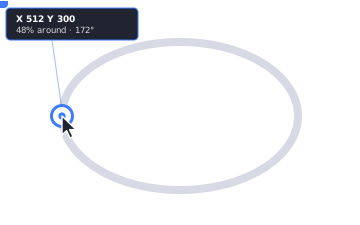
A closed loop is the hard case. A circle or an ellipse is one continuous rim with no natural “first” point, so Motion Path used to drop you at a fixed spot (three o’clock, if you’re curious) with no way to move it. Now every closed path shows a start dot right on the preview. Drag it around the loop to set exactly where your object departs — or type an exact percentage in the new Start point control. The shape stays the same; only where the motion begins changes.
It works on open paths too — a line, an arc, a signature. There the start dot slides along the path, so the object can set off partway instead of always from the very first point.
Grab the dot and a live readout follows it — the exact canvas X / Y under the point, how far it sits from the path’s start and end, the percentage along, and the heading it leaves on. The same at-a-glance numbers you get when nudging waypoints, now for the start.
Here it is on a real ellipse in the plugin — the start dot sitting on the loop, ready to drag to wherever the animation should begin:
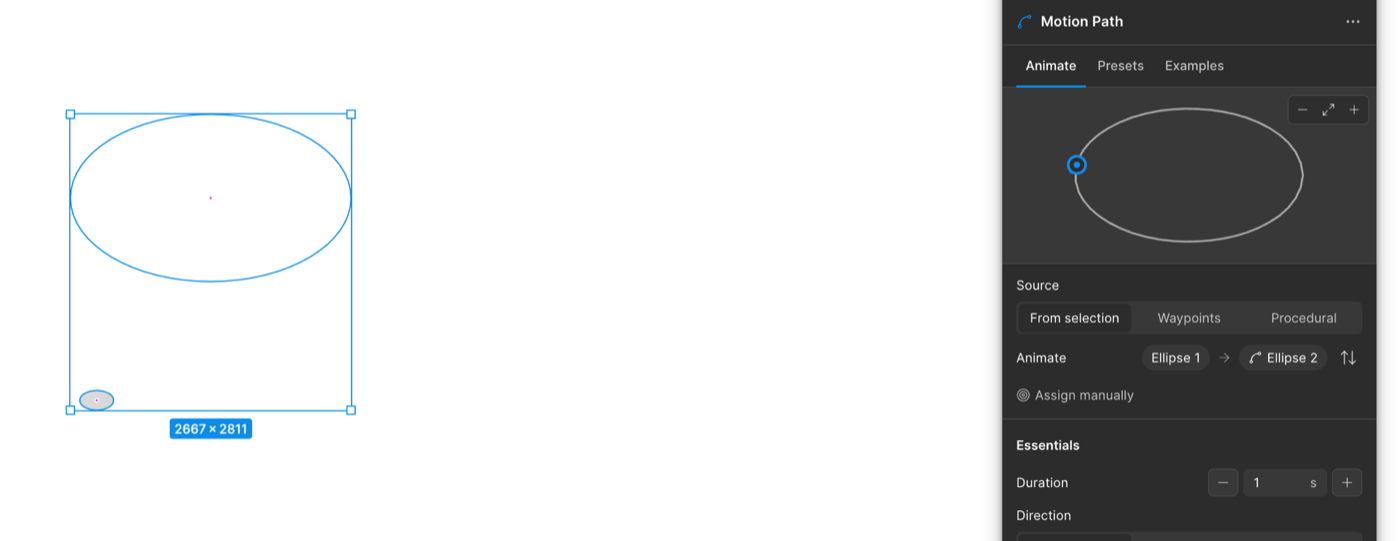
The live preview used to stand in for your layer with a plain marker. Great for reading the motion — less great for judging how your real object sits on the path. So the preview can now draw your actual layer riding the curve, at its true size relative to the path. A toggle in the preview controls flips between your object and the simple marker whenever you want the cleaner read.
While we were in there: the preview’s zoom, fit and toggle controls no longer wait for a hover to appear — they stay visible, so they’re always one click away.
All of it still bakes down to real, native Figma Motion keyframes — nothing to re-create by hand. Update from the Community page and the start dot will be waiting on your next loop.